
DS 3: Instruments
DS 3 2016-2026 Owners Manual
- Digital instrument panel
- Displays
- Customising the instrument panel
- Choosing the display mode
- Configuring a "PERSONAL" display mode
- Head-up display
- Warning and indicator lamps
- Indicators
- Service indicator
- Coolant temperature indicator
- AdBlue® range indicators (BlueHDi)
- Power indicator (Electric)
- Charge level indicator (Electric)
- Thermal comfort consumption indicator (Electric)
- Manual test. Total distance recorder
- Lighting dimmer
- Trip computer
- 5-inch touch screen
- 7-inch or 10-inch touch screen
- Remotely operable functions (Electric)
 Eco-driving
Eco-driving refers to a range of everyday practices
that allow the motorist to optimise the vehicle's
energy consumption (fuel and/or electricity) and
CO2 emissions...
 Digital instrument panel
This digital instrument panel can be customised.
Depending on the display mode selected, certain
information is hidden or presented differently.
Rev counter (x 1000 rpm) (Petrol or Diesel)Power indicator (Electric)
Cruise control or speed limiter settingsDisplay of speed limit signs
Digital speedometer (mph or km/h)
Gear with automatic gearbox (Petrol or Diesel)Drive selector position
(E..
Other information:
DS 3 2016-2026 Owners Manual: Active Lane Departure Warning System
For more information, refer to the General recommendations on the use of driving and manoeuvring aids. The system corrects the vehicle's trajectory by alerting the driver as soon as it detects a risk of involuntary lane departure or crossing of a verge or hard shoulder (depending on version). To do this, the system uses a camera, placed on the upper part of the windscreen, identifying the ..
DS 3 2016-2026 Owners Manual: Precautions
Electric vehicles were developed in accordance with the guidelines on maximum electromagnetic fields issued by the International Commission on Non-Ionizing Radiation Protection (ICNIRP - 1998 Guidelines). Wearers of pacemakers or equivalent devices The electric vehicles have been developed in accordance with the guidelines on the maximum levels for electromagnetic fields issued by the Int..
Categories
- Manuals Home
- 1st Generation DS 3 Owners Manual
- 1st Generation DS 3 Service Manual
- Activation/Deactivation
- Orange warning/indicator lamps
- Door mirrors
- New on site
- Most important about car
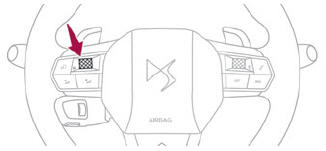
Choosing the display mode
In each mode, specific types of information are displayed on the instrument panel.

Copyright © 2026 www.ds3manuals.com