
DS 3: Access / Central locking
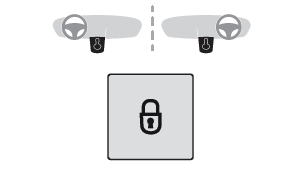
Manual
- Press this button to lock/unlock the vehicle (doors and boot) from inside the vehicle.
The indicator lamp comes on to confirm the central locking of the vehicle.
 Central locking does not
take place if any
of the doors are open.
Central locking does not
take place if any
of the doors are open.
 To unfold the exterior
handles, press the
button once when the vehicle is locked or
twice when it is unlocked.
To unfold the exterior
handles, press the
button once when the vehicle is locked or
twice when it is unlocked.
 When locking/deadlocking
from the
outside
When locking/deadlocking
from the
outside
When the vehicle is locked or deadlocked from the outside, the indicator lamp flashes and the button is deactivated.
- After normal locking, pull one of the interior door controls to unlock the vehicle.
- After deadlocking, you must use the remote control, the "Keyless Entry and Starting" system or the built-in key to unlock the vehicle.
Automatic (anti-intrusion security)
The doors and boot lock automatically while driving (speed above 6 mph (10 km/h)). To deactivate/reactivate this function (activated by default):
- Press the button until a confirmation message appears.
 Transporting long or voluminous objects
Press the central locking control to drive with the boot open and the doors locked. Otherwise, every time the speed of the vehicle exceeds 6 mph (10 km/h), the sound of the locks rebounding will be heard and an alert will be displayed.
Advice
 Remote
control
Remote
control
The remote control is a sensitive, highfrequency device; avoid handling it in your pocket, due to the risk of unintentionally unlocking the vehicle.
Avoid pressing the remote control buttons while out of range of the vehicle, due to the risk of rendering the remote control inoperative. It would then be necessary to reset it.
 Anti-theft protection
Do not modify the electronic vehicle immobiliser, as this might result in malfunctions.
 Locking
the vehicle
Locking
the vehicle
Driving with the doors locked could make it more difficult for the emergency services to enter the passenger compartment in an emergency.
As a safety precaution, take the electronic key with you when leaving the vehicle, even for a short time.
 Purchasing a second-hand vehicle
Have the key codes memorised by a dealer, to ensure that the keys in your possession are the only ones able to start the vehicle.
 Locking the vehicle
Normal locking
With the doors and boot closed, the vehicle locks:
either automatically when leaving recognition
zone B, if the automatic functions are activated;
or by a light press on a door handle;
The locking is confirmed by the illumination of
the direction indicators and the daytime running
lamps as well as an audible signal for the locking
on moving away from the vehicle...
 Back-up procedures
Lost keys, remote control, electronic key
Go to a dealer with the vehicle’s registration
certificate and your personal identification
documents.
The dealer will be able to retrieve the key code
and the transponder code, enabling a new key to
be ordered...
Other information:
DS 3 2016-2026 Owners Manual: Steering mounted controls - Type 2
Voice commands: This control is located on the steering wheel or at the end of the lighting control stalk (depending on equipment). Short press, smartphone voice commands via the system. Increase volume. Decrease volume. Mute by pressing the volume increase and decrease buttons simultaneously (depending on equipment)...
DS 3 2016-2026 Owners Manual: Steering-mounted control. Information displayed on the instrument panel.
Steering-mounted control ON (CRUISE position)/OFF Activate cruise control at the current speed/ decrease speed setting Activate cruise control at the current speed/ increase speed setting Pause/resume cruise control with the speed setting previously saved Depending on version:Display the speed thresholds saved using the Memorising speeds function or Use the speed suggested by the ..
Categories
- Manuals Home
- 1st Generation DS 3 Owners Manual
- 1st Generation DS 3 Service Manual
- Energy economy mode. Load reduction mode
- ISOFIX child seats
- Central locking
- New on site
- Most important about car
Remote control function
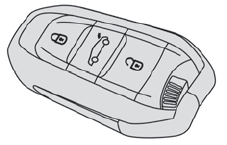
The remote control can be used for the following remote functions, depending on version:
Unlocking/Locking/Deadlocking the vehicle. Unlocking/Locking the boot. Folding/Unfolding the door mirrors. Folding/Unfolding the exterior door handles. Activating/Deactivating the alarm. Locating the vehicle. Closing the windows. Activating the vehicle’s electronic immobiliser.