DS 3: Indicators / Charge level indicator (Electric)
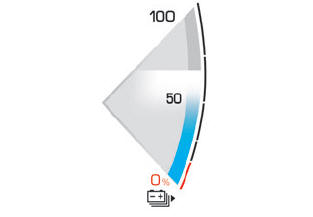
The traction battery charge status and remaining range are displayed continuously when the vehicle is started.
 With the ignition off,
opening the driver's
door activates the indicator.
With the ignition off,
opening the driver's
door activates the indicator.
Associated warning lamps
Two successive alert levels indicate that the energy available has dropped to a low level: 1st level: Reserve
 The state of charge of the
traction battery
is low.
The state of charge of the
traction battery
is low.
Fixed, accompanied by an audible signal.
- View the remaining range on the instrument panel.
- Put the vehicle on charge as soon as possible.
2nd level: Critical
 The state of charge of the
traction battery
is critical.
The state of charge of the
traction battery
is critical.
Fixed, together with the reserve warning lamp, accompanied by an audible signal.
- You must put the vehicle on charge.
 The remaining range is no
longer
calculated. The drive train power
gradually decreases.
The remaining range is no
longer
calculated. The drive train power
gradually decreases.
The heating and air conditioning are switched off (even if the thermal comfort consumption indicator is not at the "ECO" level).
 Power indicator (Electric)
CHARGE
Traction battery charging during deceleration and
braking.
ECO
Moderate energy consumption and optimised
driving range.
POWER
Energy consumption by the drive train during
acceleration...
 Thermal comfort consumption indicator (Electric)
(Depending on version)
The gauge shows the consumption of the traction
battery's electrical energy by the thermal comfort
devices in the passenger compartment...
Other information:
DS 3 2016-2026 Owners Manual: Changing a fuse
Before changing a fuse: Identify the cause of the fault and fix it. Switch off all power consumption. Immobilise the vehicle and switch off the ignition. Identify the defective fuse using the current allocation tables and diagrams. To replace a fuse, it is essential to: Use the special tweezers to extract the fuse from its housing and check the condition of its filament...
DS 3 2016-2026 Owners Manual: Warning and indicator lamps
Displayed as symbols, the warning and indicator lamps inform the driver of the occurrence of a malfunction (warning lamps) or of the operating status of a system (operation or deactivation indicator lamps). Certain lamps light up in two ways (fixed or flashing) and/or in several colours...
Categories
- Manuals Home
- 1st Generation DS 3 Owners Manual
- 1st Generation DS 3 Service Manual
- Tyre under-inflation detection
- Steering wheel adjustment
- Orange warning/indicator lamps
- New on site
- Most important about car
Choosing the display mode
In each mode, specific types of information are displayed on the instrument panel.