
DS 3: Automatic headlamp dipping / Activation/Deactivation. Operation
Activation/Deactivation
 It is set via the Driving /
Vehicle touch
screen menu.
It is set via the Driving /
Vehicle touch
screen menu.
The state of the system stays in the memory when switching off the ignition.
Operation
If the ambient light level is very low and traffic conditions permit:
 The main beam headlamps
come
on automatically. These indicator
lamps come on on the instrument panel.
The main beam headlamps
come
on automatically. These indicator
lamps come on on the instrument panel.
If the ambient light level is sufficient and/or the traffic conditions do not allow the main beam headlamps to be lit:
 The dipped beam headlamps
remain lit. These indicator lamps
come on on the instrument panel.
The dipped beam headlamps
remain lit. These indicator lamps
come on on the instrument panel.
The function is deactivated if the foglamps are switched on or if the system detects poor visibility conditions (e.g. fog, heavy rain, snowfall).
When the foglamps are switched off or when the visibility conditions become favourable again, the function is automatically reactivated.
 This indicator lamp goes out
when the
function is deactivated.
This indicator lamp goes out
when the
function is deactivated.
 If the function is selected but
the display
on the instrument panel and the alerts are
not available, the indicator lamp comes on in grey.
If the function is selected but
the display
on the instrument panel and the alerts are
not available, the indicator lamp comes on in grey.
 Automatic headlamp dipping
For
more information, refer to the General
recommendations for automatic lighting
systems.
When the lighting control ring is in the "AUTO”
position and the function is activated on the
touch screen, this system automatically switches
between dipped and main beam headlamps
depending on light and traffic conditions, using a
camera located at the top of the windscreen...
 Pause
Pause
If the situation requires a change of headlamp
beam, the driver can take over at any time.
Switch the headlamps manually between
dipped and main beam to pause the function...
Other information:
DS 3 2016-2026 Owners Manual: Operating limits. Malfunction
Operating limits Cruise control operates by day and night, in dry weather or moderate rainfall. Certain situations cannot be managed by the system and require driver intervention. Cases not taken into account by the system: Pedestrians, cyclists, animals...
DS 3 2016-2026 Owners Manual: Changing a wiper blade
Removing/Refitting at the front Carry out these wiper blade replacement operations from the driver's side. Starting with the wiper blade farthest from you, hold each arm by the rigid section and raise it as far as possible. Do not touch the wiper blades - risk of irreparable deformation...
Categories
- Manuals Home
- 1st Generation DS 3 Owners Manual
- 1st Generation DS 3 Service Manual
- SCR system
- Boot
- Steering wheel adjustment
- New on site
- Most important about car
Remote control function
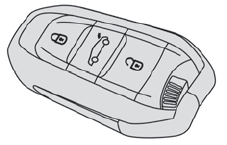
The remote control can be used for the following remote functions, depending on version:
Unlocking/Locking/Deadlocking the vehicle. Unlocking/Locking the boot. Folding/Unfolding the door mirrors. Folding/Unfolding the exterior door handles. Activating/Deactivating the alarm. Locating the vehicle. Closing the windows. Activating the vehicle’s electronic immobiliser.