
DS 3: Access / Boot
DS 3 2016-2026 Owners Manual
Opening
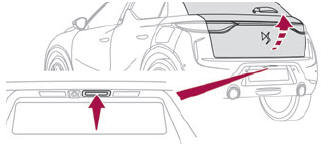
- After unlocking the vehicle or just the boot, press the opening control and then lift the tailgate.
Closing
Lower the tailgate using one of the interior grab handles.
Back-up release
To manually unlock the boot in the event of a battery or central locking failure.
Unlocking
- Fold the rear seats to gain access to the lock from inside the boot.
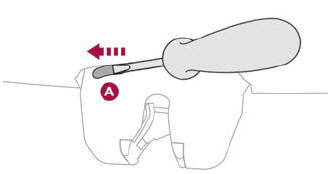
- Insert a small screwdriver into hole A of the lock to unlock the boot.
- Move the latch to the left.
Locking after closing
If the fault persists after closing again, the boot will remain locked.
 Opening
From outside
Unlock your vehicle to unfold the door handles.
Pull the handle.
When selective unlocking
is activated,
only the driver door's handle will unfold
and only the driver's door can be opened...
 Alarm
Alarm
(Depending on version)
System which protects and provides a deterrent
against theft and break-ins.
Exterior perimeter monitoring
The system checks for opening of the vehicle...
Other information:
DS 3 2016-2026 Owners Manual: Use
Activating the system (pause) With the engine running, turn the thumbwheel 1 downwards to the CRUISE position. Cruise control is ready to operate (grey display). Switching on cruise control and setting the speed With a manual gearbox, your speed must be between 19 and 112 mph (30 and 180 km/h)...
DS 3 2016-2026 Owners Manual: Hazard warning lamps. Horn. Pedestrian horn (Electric)
Hazard warning lamps Pressing this red button causes all the direction indicators to flash. They can work with the ignition switched off. Automatic operation of hazard warning lamps When braking in an emergency, depending on the rate of deceleration, the hazard warning lamps come on automatically...
Categories
- Manuals Home
- 1st Generation DS 3 Owners Manual
- 1st Generation DS 3 Service Manual
- Alarm
- Headlamp beam height adjustment
- Engine oil
- New on site
- Most important about car
Instruments and controls
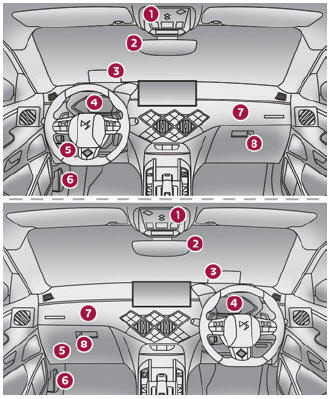
These illustrations and descriptions are provided for information only, as the locations of certain elements may vary depending on the version or trim level.

Copyright © 2026 www.ds3manuals.com