
DS 3: Overview / Instruments and controls
DS 3 2016-2026 Owners Manual
These illustrations and descriptions are provided for information only, as the locations of certain elements may vary depending on the version or trim level.
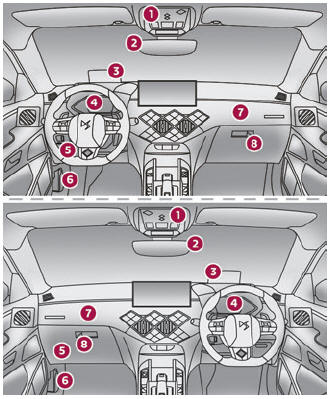
- Front courtesy/map reading lamps Emergency and assistance call buttons Warning lamp display for seat belts and front passenger airbag
- Interior rear view mirror
- Head-up display
- Digital instrument panel
- Fusebox
- Bonnet release
- Front passenger airbag
- Glove box
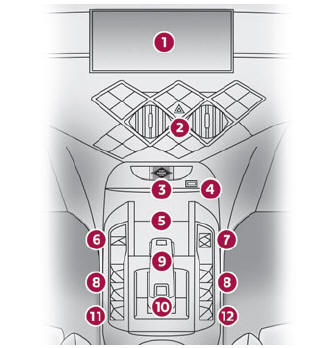
- Touch screen
- Hazard warning lamps
- Starting/switching off the engine
- USB socket
- Storage compartment or Wireless smartphone charger
- Electric parking brake
- Choice of driving mode
- Electric windows
- Gearbox or drive selector
- DS PARK PILOT
- Central locking
- Electric child lock
Steering mounted controls
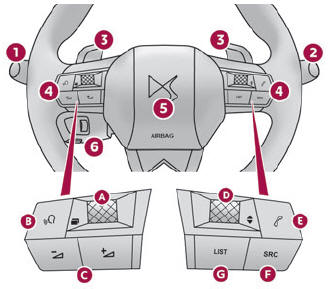
- External lighting/direction indicator controls
- Wiper/screenwash/trip computer controls
- Automatic gearbox control paddles
- Audio system controls
- Choice of instrument panel display mode
- Voice commands
- Decrease/increase volume
- Select previous/next media
Confirm a selection
- Access the Telephone menu
Manage calls
- Select an audio source
- Display the list of radio stations/audio tracks
- Horn
- Controls for Speed limiter/Cruise control/Adaptive Cruise Control
Side controls
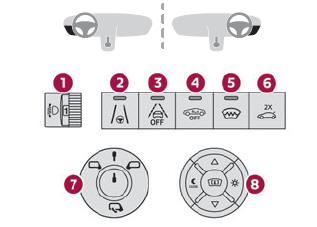
- Halogen headlamp beam height adjustment
- Lane positioning assist
- Active lane departure warning system
- Alarm
- Heated windscreen
- Opening the boot
- Door mirrors adjustment
- Head-up display controls
Central controls
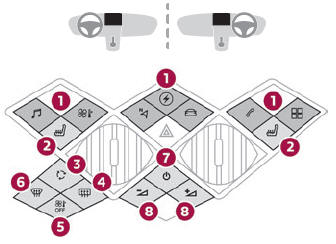
- Touch screen menus
Access to the Electric menu
- Heated seats
- Recirculation of interior air
- Rear screen defrosting
- Automatic air conditioning off
- Front demisting/defrosting
- Audio system on/off
- Decrease/increase volume
 Overview
..
 Electric motor
Charging connectors
Traction battery
Accessory battery
Heat pump
On-board charger
Electric motor
Charging cable
The charging connectors 1 enable 3 types of
charging:
Domestic charging in mode 2 using a domestic
socket and associated charging cable 7...
Other information:
DS 3 2016-2026 Owners Manual: Localised Emergency Call (PE112)
In an emergency, press button 1 for more than 2 seconds. The lighting of the indicator lamp and a voice message confirm that the call has been made to the emergency services*. ‘Localised Emergency Call’ immediately locates your vehicle and puts you in contact with the appropriate emergency services**...
DS 3 2016-2026 Owners Manual: Manual adjustments
Longitudinal Raise the control bar and slide the seat forwards or backwards. Release the control bar to lock the seat in position on one of the notches. Backrest angle Turn the knob to obtain the desired angle. Height Pull the control upwards to raise or push it downwards to lower, until you obtain the position required...
Categories
- Manuals Home
- 1st Generation DS 3 Owners Manual
- 1st Generation DS 3 Service Manual
- SCR system
- Central locking
- Energy economy mode. Load reduction mode
- New on site
- Most important about car
Remote control function
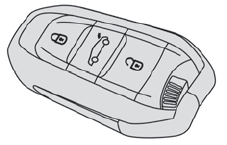
The remote control can be used for the following remote functions, depending on version:
Unlocking/Locking/Deadlocking the vehicle. Unlocking/Locking the boot. Folding/Unfolding the door mirrors. Folding/Unfolding the exterior door handles. Activating/Deactivating the alarm. Locating the vehicle. Closing the windows. Activating the vehicle’s electronic immobiliser.
Copyright © 2026 www.ds3manuals.com