
DS 3: Driving / Blind Spot Detection
DS 3 2016-2026 Owners Manual
 For more information,
refer to the General
recommendations on the use of driving
and manoeuvring aids.
For more information,
refer to the General
recommendations on the use of driving
and manoeuvring aids.
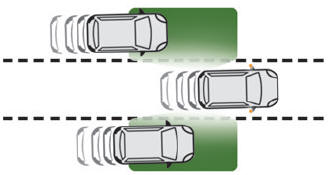
This system warns the driver of a potential danger posed by the presence of another vehicle (car, lorry, motorcycle) in the vehicle's blind spots (areas hidden from the driver's field of vision) using sensors located on the sides of the bumpers.
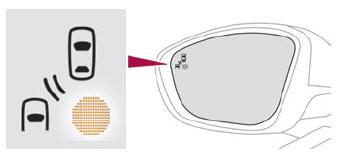
The warning is given by a fixed warning lamp that appears in the door mirror on the side in question:
- immediately, when being overtaken;
- after a delay of about one second, when overtaking a vehicle slowly.
 Deactivation/Activation. Malfunction
Deactivation/Activation
Press this button to deactivate/reactivate the system at any time.
Deactivation is signalled by the
lighting of the indicator lamp in the button and this warning lamp in the
instrument panel...
 Activation/Deactivation. Operating conditions
Activation/Deactivation
It is set via the Driving/Vehicle
touch
screen menu.
When starting the vehicle, the warning lamp
comes on in each mirror to indicate that the
system is activated...
Other information:
DS 3 2016-2026 Owners Manual: Correct driving position
For safety reasons, adjustments must only be made when the vehicle is stationary. Before taking to the road and to make the most of the ergonomic layout of the instruments and controls, carry out these adjustments in the following order: head restraint height...
DS 3 2016-2026 Owners Manual: Automatic illumination of headlamps
With the lighting control stalk in the “AUTO” position and if a low level of exterior brightness is detected by the rain/sunshine sensor, the sidelamps and dipped beam headlamps are switched on automatically, without any action on the part of the driver...
Categories
- Manuals Home
- 1st Generation DS 3 Owners Manual
- 1st Generation DS 3 Service Manual
- Energy economy mode. Load reduction mode
- Tyre under-inflation detection
- Activation/Deactivation
- New on site
- Most important about car
Principle of operation
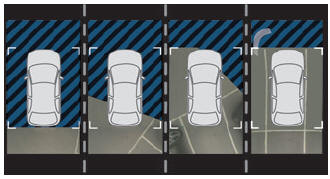
Using the rear camera, the vehicle's close surroundings are recorded during manoeuvres at low speed.

Copyright © 2026 www.ds3manuals.com