
DS 3: Active Lane Departure Warning System / Deactivation/Activation. Malfunction
DS 3 2016-2026 Owners Manual
Deactivation/Activation
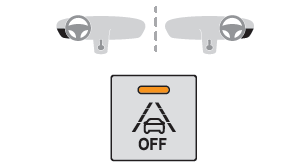
- Press this button to deactivate/reactivate the system at any time.
 Deactivation is signalled by the
lighting of the indicator lamp in the button and this warning lamp in the
instrument panel.
Deactivation is signalled by the
lighting of the indicator lamp in the button and this warning lamp in the
instrument panel.
The system is automatically reactivated every time the ignition is switched on.
Malfunction
 In the event of a malfunction,
these warning lamps light up on the instrument panel, accompanied by the display
of a message and an audible signal.
In the event of a malfunction,
these warning lamps light up on the instrument panel, accompanied by the display
of a message and an audible signal.
Have it checked by a dealer or a qualified workshop.
 Operating limits
The system goes into standby automatically in
the following cases:
ESC deactivated or operation triggered.
Speed below 43 mph (70 km/h) or greater than
112 mph (180 km/h),
Electrical connection of a trailer...
 Blind Spot Detection
For more information,
refer to the General
recommendations on the use of driving
and manoeuvring aids.
This system warns the driver of a potential
danger posed by the presence of another vehicle
(car, lorry, motorcycle) in the vehicle's blind
spots (areas hidden from the driver's field of
vision) using sensors located on the sides of the
bumpers...
Other information:
DS 3 2016-2026 Owners Manual: Automatic air conditioning
The air conditioning operates with the engine running, but the ventilation and its controls can be accessed with the ignition on. Operation of the air conditioning and regulation of temperature, air flow and air distribution in the passenger compartment are automatic...
DS 3 2016-2026 Owners Manual: Engine compartment fuses
The fusebox is placed in the engine compartment near the battery. Accessing the fuses Release the two latches A. Remove the cover. Replace the fuse. When you have finished, close the cover carefully, then engage the two latches A to ensure that the fusebox is properly sealed...
Categories
- Manuals Home
- 1st Generation DS 3 Owners Manual
- 1st Generation DS 3 Service Manual
- Child lock
- Boot
- Tyre under-inflation detection
- New on site
- Most important about car
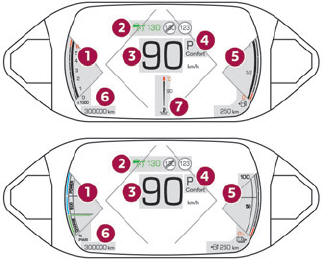
Digital instrument panel
This digital instrument panel can be customised. Depending on the display mode selected, certain information is hidden or presented differently.

Copyright © 2026 www.ds3manuals.com