
DS 3: Instruments / Digital instrument panel
DS 3 2016-2026 Owners Manual
This digital instrument panel can be customised. Depending on the display mode selected, certain information is hidden or presented differently.
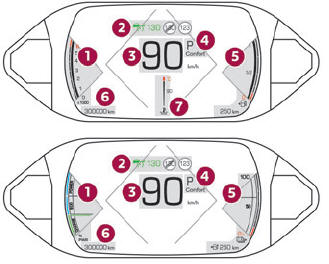
- Rev counter (x 1000 rpm) (Petrol or Diesel)
Power indicator (Electric)
- Cruise control or speed limiter settings
Display of speed limit signs
- Digital speedometer (mph or km/h)
- Gear with automatic gearbox (Petrol or Diesel)
Drive selector position (Electric)
Gear shift indicator (arrow and recommended gear)
Driving mode selected
- Fuel gauge (Petrol or Diesel)
Charge level indicator (Electric)
Remaining range (miles or km)
- Total distance recorder (miles or km)
- Coolant temperature indicator (°C) (Petrol or Diesel)
- Displays
- Customising the instrument panel
- Choosing the display mode
- Configuring a "PERSONAL" display mode
 Instruments
..
 Displays
Some lamps have a fixed location, others can
change location.
For certain functions that have indicator lamps
for both operation and deactivation, there is only
one dedicated location...
Other information:
DS 3 2016-2026 Owners Manual: Telephone
Pairing a Bluetooth® telephone The services available depend on the network, the SIM card and the compatibility of the Bluetooth devices used. Consult the telephone user guide and the service provider to check which services are available. The Bluetooth function must be activated and the telephone configured as "Visible to all” (in the telphone settings)...
DS 3 2016-2026 Owners Manual: Unlocking the vehicle
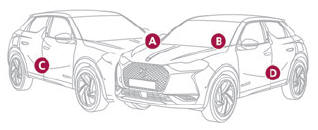
Selective unlocking (driver’s door, boot) is configured in the Driving/Vehicle touch screen menu. Selective unlocking is deactivated by default. Complete unlocking The vehicle (doors and boot) unlocks: either automatically when the driver is approaching (zone C), if the automatic functions are activated; or by a light press on a handle...
Categories
- Manuals Home
- 1st Generation DS 3 Owners Manual
- 1st Generation DS 3 Service Manual
- Child lock
- Activation/Deactivation
- Trip computer
- New on site
- Most important about car
Identification markings
Various visible markings for vehicle identification and vehicle search.

Copyright © 2026 www.ds3manuals.com