DS 3: Blind Spot Detection / Operating limits. Malfunction
Operating limits
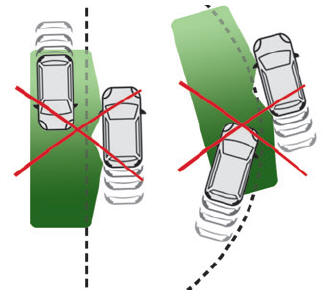
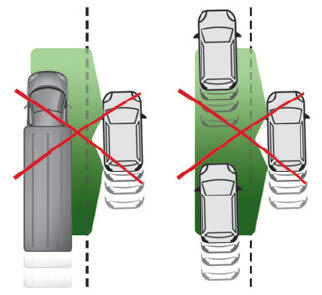
No alert is triggered in the following conditions:
- presence of stationary objects (e.g. parked vehicles, safety rails, lampposts, signs).
- vehicles travelling in the opposite direction.
- on winding roads or in case of sharp turns.
- when overtaking or being overtaken by a very long vehicle (e.g. truck, bus), which is both detected in a blind spot from behind and present in the driver's field of vision from the front.
- quick overtaking manoeuvre.
- very heavy traffic: vehicles detected in front and behind are confused with a lorry or a stationary object.
- activation of the Park Assist or DS PARK PILOT function.
Malfunction
 If the event of a malfunction,
this warning
lamp comes on in the instrument panel,
accompanied by the display of a message.
Have it checked by a dealer or a qualified
workshop.
If the event of a malfunction,
this warning
lamp comes on in the instrument panel,
accompanied by the display of a message.
Have it checked by a dealer or a qualified
workshop.
 The system may be
temporarily disturbed
by certain climatic conditions (e.g. rain,
hail).
The system may be
temporarily disturbed
by certain climatic conditions (e.g. rain,
hail).
In particular, driving on a wet road or going from a dry to a wet area can cause false alerts (e.g. presence of a cloud of water droplets in the blind spot interpreted as a vehicle).
In bad or wintry weather, ensure that the sensors are not covered by mud, ice or snow.
Take care not to cover the warning zone in the door mirrors, or the detection zones on the front and rear bumpers with adhesive labels or other objects; they may hamper correct operation of the system.
 Activation/Deactivation. Operating conditions
Activation/Deactivation
It is set via the Driving/Vehicle
touch
screen menu.
When starting the vehicle, the warning lamp
comes on in each mirror to indicate that the
system is activated...
 Active Safety Brake with Collision Risk Alert and Intelligent emergency
braking assistance
Active Safety Brake with Collision Risk Alert and Intelligent emergency
braking assistance
For more information,
refer to the General
recommendations on the use of driving
and manoeuvring aids.
This system:
warns the driver that their vehicle is at risk of
collision with the vehicle in front, a pedestrian or,
depending on version, a cyclist...
Other information:
DS 3 2016-2026 Owners Manual: Power indicator (Electric)
CHARGE Traction battery charging during deceleration and braking. ECO Moderate energy consumption and optimised driving range. POWER Energy consumption by the drive train during acceleration. NEUTRAL On switching on the ignition, your vehicle’s electric drive train neither consumes nor generates energy: after sweeping over the indicator, the cursor returns to its "neutral" position...
DS 3 2016-2026 Owners Manual: Opening
From outside Unlock your vehicle to unfold the door handles. Pull the handle. When selective unlocking is activated, only the driver door's handle will unfold and only the driver's door can be opened. From inside Pull the interior door opening lever; the exterior door handles unfold automatically...
Categories
- Manuals Home
- 1st Generation DS 3 Owners Manual
- 1st Generation DS 3 Service Manual
- Child lock
- Welcome
- Use
- New on site
- Most important about car
Selector