DS 3: Access / Proximity Keyless Entry and Start
This is a Keyless Entry and Starting system. It enables automatic vehicle locking/unlocking simply by detecting the electronic key.
As long as the driver has the electronic key on their person, the vehicle unlocks as they approach and locks when they walk away.
If the electronic key is present in an area between 2 and 7 m from the vehicle for more than 30 minutes, the system is deactivated to preserve the battery.
Key recognition zones:
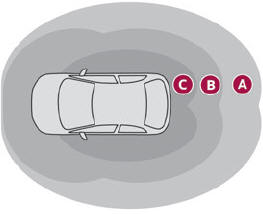
Zone A: welcome lighting on approaching the vehicle (between 3 and 5 metres from the vehicle).
Zone B: automatic locking on leaving the vehicle (about 2 metres from the vehicle).
Zone C: automatic unlocking on approaching the vehicle (between 1 and 2 metres from the vehicle).
 The automatic functions are
configured
via the Driving/Vehicle touch screen menu.
The automatic functions are
configured
via the Driving/Vehicle touch screen menu.
With the electronic key on their person, the driver can also lock and unlock their vehicle by pressing the retractable handles.
For more information on Retractable handles, refer to the corresponding section.
 Locating the vehicle
Helps you to locate your vehicle from a distance,
with the vehicle locked:
The direction indicators flash for approximately
10 seconds.
The door mirror spotlamps come on...
 Unlocking the vehicle
Selective unlocking (driver’s
door, boot) is
configured in the Driving/Vehicle touch
screen menu.
Selective unlocking is deactivated by default...
Other information:
DS 3 2016-2026 Owners Manual: Choice of a destination
To a new destination Intuitive method: Press Navigation to display the main page. Press "Search…". Enter an address or the key words for the destination. Press "OK" to select the "Guidance criteria". Or Guided method: In order to be able to use the navigation, you must enter the "City", the "Street" (suggestions are displayed automatically when you begin typing), then enter the "N..
DS 3 2016-2026 Owners Manual: Displaying charging station details
Press Navigation to display the main page. Press this button to display the list of services. Press "POI on map" to display the list of points of interest. Press one of the buttons to search for "Stations". Activate/deactivate "Stations". Press this button to display a secondary page. Select the "Settings" tab. Select the desired connector type. Press "OK" to save...
Categories
- Manuals Home
- 1st Generation DS 3 Owners Manual
- 1st Generation DS 3 Service Manual
- Boot
- Use
- Tyre under-inflation detection
- New on site
- Most important about car
Electric motor