
DS 3: Electronic key with remote control function and built-in key / Locating the vehicle
DS 3 2016-2026 Owners Manual
Helps you to locate your vehicle from a distance, with the vehicle locked:
- The direction indicators flash for approximately 10 seconds.
- The door mirror spotlamps come on.
- The courtesy lamps come on.
 Press this button.
 Locking the vehicle
Normal locking
Press the locking button.
The locking, and the activation of the alarm
depending on version, is confirmed by the lighting
of the direction indicators and the daytime
running lamps...
 Proximity Keyless Entry and Start
This is a Keyless Entry and Starting system.
It enables automatic vehicle locking/unlocking
simply by detecting the electronic key.
As long as the driver has the electronic key on
their person, the vehicle unlocks as they approach
and locks when they walk away...
Other information:
DS 3 2016-2026 Owners Manual: Settings specific to connected navigation
Press Navigation to display the main page. Press the "MENU" button to access the secondary page. Select "Settings". Select the "Map” tab. Activate or deactivate: "Allow declaration of danger zones". "Guidance to final destination on foot". These settings must be configured for each profile...
DS 3 2016-2026 Owners Manual: Operating limits. Malfunction
Operating limits The system may issue an alert when the vehicle is travelling on a long, straight road with smooth road surface even if the driver thinks they are holding the steering wheel correctly. The system may not operate or may produce unsuitable corrections to the steering in the following situations: Poor visibility (insufficient road lighting, snowfall, rain, fog)...
Categories
- Manuals Home
- 1st Generation DS 3 Owners Manual
- 1st Generation DS 3 Service Manual
- Central locking
- Trip computer
- Welcome
- New on site
- Most important about car
Principle of operation
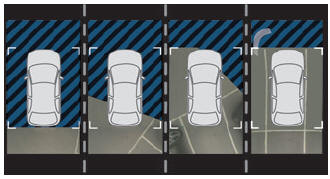
Using the rear camera, the vehicle's close surroundings are recorded during manoeuvres at low speed.

Copyright © 2026 www.ds3manuals.com