
DS 3: Lighting and visibility
DS 3 2016-2026 Owners Manual
- Exterior lighting control stalk
- Daytime running lamps / Sidelamps
- Direction indicators
- Automatic illumination of headlamps
- Headlamp beam height adjustment
- Guide-me-home and welcome lighting
- Automatic lighting systems - General recommendations
- Automatic headlamp dipping
- DS MATRIX LED VISION
- Wiper control stalk
- Changing a wiper blade
- Automatic wipers
 Boot fittings
Load space cover
Boot lamp
Stowing rings
Boot mat
Tool kit (depending on equipment)
Storage well
The stowing rings are
designed to secure
luggage using different types of retaining
nets...

Other information:
DS 3 2016-2026 Owners Manual: Intelligent emergency braking assistance (iEBA). Active Safety Brake
Intelligent emergency braking assistance (iEBA) If the driver brakes, but not sufficiently to avoid a collision, this system will provide additional braking, within the limits of the laws of physics. This assistance will only be provided if the driver presses the brake pedal. Active Safety Brake This function, also called automatic emergency braking, intervenes following the alerts if the dr..
DS 3 2016-2026 Owners Manual: DS MATRIX LED VISION
For more information, refer to the General recommendations for automatic lighting systems. Available only on versions equipped with Full LED headlamps with Matrix Beam function. This system automatically adapts the main beam according to the driving conditions, so that optimum illumination is maintained for the driver, without causing a nuisance to other road users. The driver remains re..
Categories
- Manuals Home
- 1st Generation DS 3 Owners Manual
- 1st Generation DS 3 Service Manual
- Stop & Start
- Engine oil
- Tyre under-inflation detection
- New on site
- Most important about car
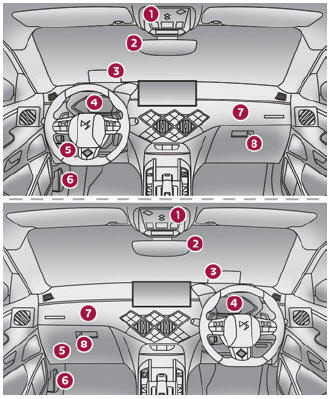
Instruments and controls
These illustrations and descriptions are provided for information only, as the locations of certain elements may vary depending on the version or trim level.

Copyright © 2026 www.ds3manuals.com