DS 3: Ease of use and comfort / Boot fittings
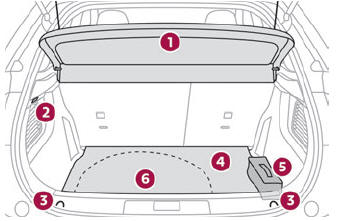
- Load space cover
- Boot lamp
- Stowing rings
- Boot mat
- Tool kit (depending on equipment)
- Storage well
 The stowing rings are
designed to secure
luggage using different types of retaining
nets. They are used with the ISOFIX mounting
rings located behind the rear seats.
The stowing rings are
designed to secure
luggage using different types of retaining
nets. They are used with the ISOFIX mounting
rings located behind the rear seats.
The retaining nets are available as an option or as an accessory.
For more information, contact a dealer.
Load space cover
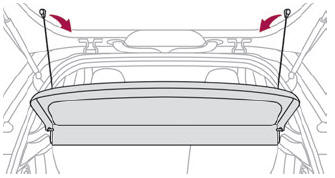
To remove the load space cover:
- unhook the two cords,
- gently lift the shelf, then remove it.
 When sharp deceleration
occurs, objects
placed on the load space cover can turn
into projectiles.
When sharp deceleration
occurs, objects
placed on the load space cover can turn
into projectiles.
Storage well
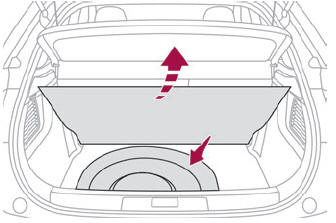
- Lift the boot carpet as far as possible to access the storage well.
Depending on version, it includes:
- A spare wheel with or without the tool kit.
- The traction battery charging cable (Electric).
High load retaining net
This removable net allows the entire load volume behind the front seats to be used up to the roof when the rear seats are folded. It offers protection to the occupants when very sharp braking occurs.
- Fold down the rear seats.
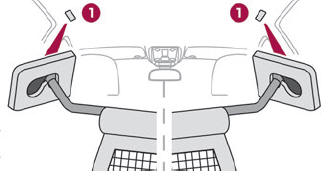
- Insert the ends of the bar, one after the other, into fixing points 1 of the roof.
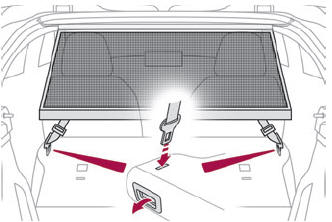
- Attach the net’s straps to the lower anchoring points, located on the fixings of the rear bench seat backrest.
- Pull on the straps to stretch the net.
Boot lamp
It comes on automatically when the boot is opened and goes off automatically when the boot is closed.
The lighting time varies according to the circumstances:
- When the ignition is off, approximately 10 minutes.
- In energy saving mode, approximately 30 seconds.
- With the engine running, unlimited.
 Touch-sensitive courtesy lamps
Front touch-sensitive courtesy lamp
Front touch-sensitive reading lamps
Rear touch-sensitive reading lamps
Front touch-sensitive courtesy lamp
It comes on gradually:
when the vehicle is unlocked...

Other information:
DS 3 2016-2026 Owners Manual: Operating limits. Malfunctions
Operating limits The system may suggest an inappropriate parking space (parking prohibited, work in progress with damaged road surface, location alongside a ditch, etc.). The system may indicate that a space has been found but will not offer it because of a fixed obstacle on the opposite side of the manoeuvre, which would not allow the vehicle to follow a trajectory required for p..
DS 3 2016-2026 Owners Manual: Activation/Deactivation. Operating conditions
Activation/Deactivation It is set via the Driving/Vehicle touch screen menu. When starting the vehicle, the warning lamp comes on in each mirror to indicate that the system is activated. The status of the system is memorised when the ignition is switched off. The system is automatically deactivated when towing with a towing device approved by the Manufacturer. Operating conditions All ..
Categories
- Manuals Home
- 1st Generation DS 3 Owners Manual
- 1st Generation DS 3 Service Manual
- Central locking
- Steering wheel adjustment
- Alarm
- New on site
- Most important about car
Selector