
DS 3: Technical data
DS 3 2016-2026 Owners Manual
- Engine technical data and towed loads
- Petrol engines. Diesel engines. Electric motor
- Identification markings
- Dimensions
 Towing another vehicle
To access the rear screw thread:
Unclip the cover by pressing at its left-hand
section.
Pull the cover downwards.
To tow:
Screw the towing eye in fully...
 Engine technical data and towed loads
Engines
The engine characteristics are given in the
vehicle's registration document, as well as in
sales brochures.
Only the values available at the time of
publication are presented in the tables...
Other information:
DS 3 2016-2026 Owners Manual: Tool kit
Set of tools supplied with the vehicle. Its content depends on your vehicle's equipment: Temporary puncture repair kit. Spare wheel. Access to the tools Depending on version, the tool kit is stored in a bag or in a storage box in the boot. On the boot carpet In the event of a breakdown Under the boot carpet Raise the boot carpet by pulling the strap to access the tools...
DS 3 2016-2026 Owners Manual: Cruise control - particular recommendations
For the safety of everyone, only use the cruise control where the driving conditions allow running at a constant speed and keeping an adequate safety distance. Remain vigilant when the cruise control is activated. If you hold one of the speed setting modification buttons down, a very rapid change in the speed of your vehicle may occur...
Categories
- Manuals Home
- 1st Generation DS 3 Owners Manual
- 1st Generation DS 3 Service Manual
- Service indicator
- Energy economy mode. Load reduction mode
- ISOFIX child seats
- New on site
- Most important about car
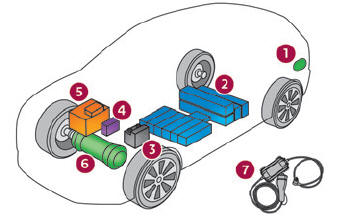
Electric motor

Copyright © 2026 www.ds3manuals.com