
DS 3: Navigation / TMC (Traffic Message Channel)
DS 3 2016-2026 Owners Manual
Available in some countries.
TMC (Traffic Message Channel) messages are based on a European standard for traffic information broadcasting via the RDS system on FM radio, sending traffic information in real time.
The TMC information is then displayed on a GPS Navigation system map and taken into account straight away when routes are calculated, to avoid accidents, traffic jams and closed roads.
 Danger zone alerts may or may not be
displayed, depending on the applicable
legislation and subscription to the
corresponding service.
Danger zone alerts may or may not be
displayed, depending on the applicable
legislation and subscription to the
corresponding service.
 To GPS coordinates
ress Navigation to display the main page.
Explore the map by sliding a finger on the screen.
Touch the screen with a finger to go to the next
image...

Other information:
DS 3 2016-2026 Owners Manual: Media
Selecting the source Press the "Media" menu. Press the "SOURCE" button. Select the source (USB, Bluetooth or AUX, depending on equipment). USB port Insert the USB memory stick into the USB port or connect the USB device to the USB port using a suitable cable (not supplied). To protect the system, do not use a USB hub. The system builds playlists (in temporary memory); this operation can ta..
DS 3 2016-2026 Owners Manual: Authorize sending information
Press Settings to display the main page. Press the "OPTIONS" button to access the secondary page. Select "System configuration". Select the "Private mode" tab. OR Press "Notifications". Press "Private mode". THEN Activate or deactivate: "No data sharing except for company vehicles". "Only data sharing" "Sharing data and vehicle position" ..
Categories
- Manuals Home
- 1st Generation DS 3 Owners Manual
- 1st Generation DS 3 Service Manual
- Headlamp beam height adjustment
- Activation/Deactivation
- SCR system
- New on site
- Most important about car
Principle of operation
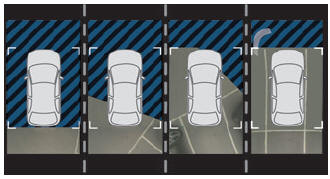
Using the rear camera, the vehicle's close surroundings are recorded during manoeuvres at low speed.

Copyright © 2026 www.ds3manuals.com