
DS 3: Ease of use and comfort / Steering wheel adjustment
DS 3 2016-2026 Owners Manual
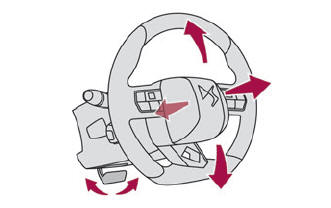
- When stationary, pull the control to release the steering wheel.
- Adjust the height and reach to suit your driving position.
- Push the control to lock the steering wheel.
 For safety reasons, these
adjustments
must only be carried out with the vehicle
stationary.
For safety reasons, these
adjustments
must only be carried out with the vehicle
stationary.
 Heated seats
The function is active only with the engine
running.
Press the button corresponding to the seat.
Each press changes the heating level; the
corresponding number of indicator lamps come
on...
 Mirrors
..
Other information:
DS 3 2016-2026 Owners Manual: i-Size child seats. Installing child seats
i-Size child seats i-Size child seats have two latches that are anchored to the two rings A. These i-Size child seats also have: either an upper strap that is attached to ring B. or a support leg that rests on the vehicle floor, compatible with the approved i-Size seat position. Their role is to prevent the child seat from tipping forward in the event of a collision. For more information on..
DS 3 2016-2026 Owners Manual: Activation/Deactivation. Operation
Activation/Deactivation It is set via the Driving / Vehicle touch screen menu. The state of the system stays in the memory when switching off the ignition. Operation If the ambient light level is very low and traffic conditions permit: The main beam headlamps come on automatically. These indicator lamps come on on the instrument panel. If the ambient light level is sufficient and/or..
Categories
- Manuals Home
- 1st Generation DS 3 Owners Manual
- 1st Generation DS 3 Service Manual
- Tyre under-inflation detection
- Central locking
- Service indicator
- New on site
- Most important about car
Remote control function
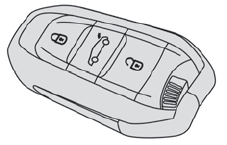
The remote control can be used for the following remote functions, depending on version:
Unlocking/Locking/Deadlocking the vehicle. Unlocking/Locking the boot. Folding/Unfolding the door mirrors. Folding/Unfolding the exterior door handles. Activating/Deactivating the alarm. Locating the vehicle. Closing the windows. Activating the vehicle’s electronic immobiliser.
Copyright © 2026 www.ds3manuals.com