
DS 3: Practical information / Misfuel prevention (Diesel)
(Depending on country of sale.)
This mechanical device prevents filling the tank of a Diesel vehicle with petrol.
Located in the filler neck, the misfuel prevention device is visible when the filler cap is removed.
Operation
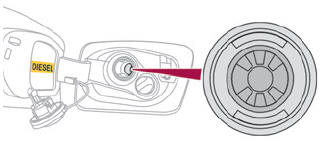
When a petrol filler nozzle is introduced into the fuel filler neck of a Diesel vehicle, it comes into contact with the flap. The system remains closed and prevents filling.
Do not persist but introduce a Diesel type filler nozzle.
 The use of a fuel jerrycan
to fill the tank
remains possible.
The use of a fuel jerrycan
to fill the tank
remains possible.
 Travelling abroad
As Diesel fuel pump nozzles may be different in other countries, the presence of the misfuel prevention device may make refuelling impossible.
Before travelling abroad, it is advisable to check with a dealer if the vehicle is suitable for the distribution equipment of the countries visited.
 Refuelling
Fuel tank capacity: approximately 44 litres
(Petrol) or 41 litres (Diesel).
Reserve level: approximately 6 litres.
Low fuel level
When the low fuel level is
reached, this
warning lamp lights up on the instrument
panel, accompanied by the display of a message
and an audible signal...

Other information:
DS 3 2016-2026 Owners Manual: Trip computer
Displays information related to the current trip (range, fuel consumption, average speed, etc.). Data displayed on the instrument panel Display of the various tabs Pressing the button located on the end of the wiper control stalk displays the following tabs in turn: Current information: Driving range (Petrol or Diesel). Current fuel consumption. Stop & Start time counter (Pe..
DS 3 2016-2026 Owners Manual: Steering mounted controls
Radio: Select the previous/next preset radio station. Select the previous/next item in a menu or a list. Media: Select the previous/next track. Select the previous/next item in a menu or a list. Radio: Short press: display the list of radio stations. Long press: update the list. Media: Short press: display the list of folders. Long press: display the available sorting options. Short press: c..
Categories
- Manuals Home
- 1st Generation DS 3 Owners Manual
- 1st Generation DS 3 Service Manual
- Stop & Start
- Steering wheel adjustment
- Headlamp beam height adjustment
- New on site
- Most important about car
Display in operation
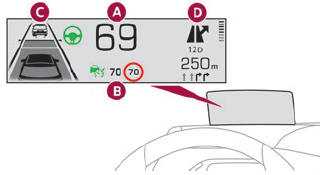
Once the system has been activated, the following information is grouped together in the head-up display:
The speed of the vehicle. Cruise control/speed limiter information and, if the vehicle is so equipped, the Road signs recognition function. If the vehicle is so equipped, inter-vehicle distance information, lane departure warning system information, lane positioning assist information, and automatic emergency braking alerts. If the vehicle is so equipped, navigation information.