
DS 3: Electric parking brake / Indicator lamp
 This indicator lamp comes on
both on the
instrument panel and on the control to
confirm that the parking brake has been applied, accompanied by display of the
message "Parking
brake applied".
This indicator lamp comes on
both on the
instrument panel and on the control to
confirm that the parking brake has been applied, accompanied by display of the
message "Parking
brake applied".
The indicator lamp goes out to confirm the release of the parking brake, accompanied by the display of the message "Parking brake released".
The indicator lamp flashes in response to a manual request to apply or release the brake.
 In the event of a battery failure, the
electric parking brake will not operate.
In the event of a battery failure, the
electric parking brake will not operate.
As a safety measure, with a manual gearbox, if the parking brake is not applied, immobilise the vehicle by engaging a gear.
As a safety measure, with an automatic gearbox or drive selector, if the parking brake is not applied, immobilise the vehicle by placing the supplied chock against one of the wheels.
Contact a dealer or a qualified workshop.
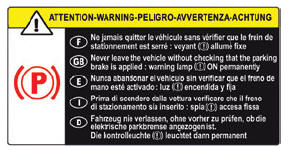
 Before leaving the
vehicle, check that the
parking brake is applied: the parking
brake indicator lamps on the instrument panel
and the control must be on fixed.
Before leaving the
vehicle, check that the
parking brake is applied: the parking
brake indicator lamps on the instrument panel
and the control must be on fixed.
If the parking brake is not applied, there is an audible signal and a message is displayed on opening the driver's door.
 Never leave a child alone
inside the
vehicle, as they could release the parking
brake.
Never leave a child alone
inside the
vehicle, as they could release the parking
brake.
 When the vehicle is
parked: on a steep
slope, heavily loaded or during towing
When the vehicle is
parked: on a steep
slope, heavily loaded or during towing
With a manual gearbox, turn the wheels toward the pavement and engage a gear.
With an automatic gearbox or a drive selector, turn the wheels toward the pavement and select mode P.
When towing, the vehicle is approved for parking on slopes of up to 12%.
 Electric parking brake
In automatic mode, this system applies the
parking brake when the engine is switched off
and releases it when the vehicle moves off.
At any time, with the engine running:
To apply the parking brake, briefly pull the
control...
 Manual and Automatic operation
Manual operation
Manual release
With the ignition on or engine running:
Press the brake pedal.
While maintaining pressure on the brake
pedal, briefly push the control...
Other information:
DS 3 2016-2026 Owners Manual: Accessing the battery
The battery is located under the bonnet. For access to the (+) terminal: Release the bonnet by pulling the internal release lever, then the external safety catch. Raise the bonnet. (+) Positive terminal. This terminal has a quick-release clamp...
DS 3 2016-2026 Owners Manual: Steering mounted controls - Type 2
Voice commands: This control is located on the steering wheel or at the end of the lighting control stalk (depending on equipment). Short press, smartphone voice commands via the system. Increase volume. Decrease volume. Mute by pressing the volume increase and decrease buttons simultaneously (depending on equipment)...
Categories
- Manuals Home
- 1st Generation DS 3 Owners Manual
- 1st Generation DS 3 Service Manual
- Orange warning/indicator lamps
- Boot
- Trip computer
- New on site
- Most important about car
Display in operation
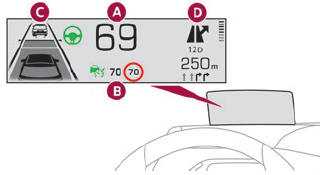
Once the system has been activated, the following information is grouped together in the head-up display:
The speed of the vehicle. Cruise control/speed limiter information and, if the vehicle is so equipped, the Road signs recognition function. If the vehicle is so equipped, inter-vehicle distance information, lane departure warning system information, lane positioning assist information, and automatic emergency braking alerts. If the vehicle is so equipped, navigation information.