
DS 3: Cruise control / Steering-mounted control. Information displayed on the instrument panel.
DS 3 2016-2026 Owners Manual
Steering-mounted control
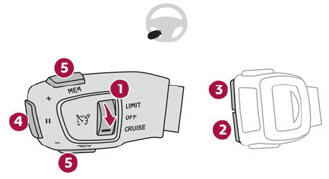
- ON (CRUISE position)/OFF
- Activate cruise control at the current speed/ decrease speed setting
- Activate cruise control at the current speed/ increase speed setting
- Pause/resume cruise control with the speed setting previously saved
- Depending on version:
Display the speed thresholds saved using the Memorising speeds function
or
Use the speed suggested by the Speed Limit Recognition and Recommendation (MEM display)
For more information on Memorising speeds or the Speed Limit Recognition and Recommendation, refer to the corresponding sections.
Information displayed on the instrument panel
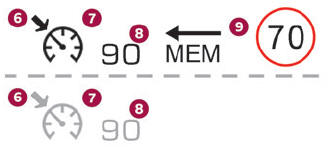
- Crui
- l pause/resume
- Cruise control mode selection
- Speed setting value
- Speed suggested by the Speed Limit recognition and recommendation system (depending on vers
- se controion)
 Cruise control
For
more information, refer to the General
recommendations on the use of driving
and manoeuvring aids and the Cruise control
- particular recommendations...
 Switching on/pausing. Modifying the cruise speed setting. Switching
off. Malfunction
Switching on/pausing. Modifying the cruise speed setting. Switching
off. Malfunction
Switching on/pausing
Turn thumbwheel 1 to the "CRUISE" position
to select cruise control mode; the function is
paused.
Press button 2 or 3 to activate cruise control
and save a speed setting when the vehicle has
reached the desired speed; the vehicle’s current
speed is saved as the speed setting...
Other information:
DS 3 2016-2026 Owners Manual: DS PARK PILOT
For more information, refer to the General recommendations on the use of driving and manoeuvring aids. This system provides active parking assistance for vehicles fitted with the EAT8 automatic gearbox or a gear selector: it detects a free "parallel" or "bay" parking space and then operates the vehicle, parking it with no need for driver intervention...
DS 3 2016-2026 Owners Manual: Steering-mounted controls
ON (CRUISE position)/OFF Activation of cruise control at the current speed/decrease speed setting Activation of cruise control at the current speed/increase speed setting Pause/resume cruise control with the speed setting previously savedConfirmation of vehicle restart after automatic stop (versions with Stop & Go function) Depending on version:Display the speed thresholds save..
Categories
- Manuals Home
- 1st Generation DS 3 Owners Manual
- 1st Generation DS 3 Service Manual
- Welcome
- Alarm
- Headlamp beam height adjustment
- New on site
- Most important about car
Principle of operation
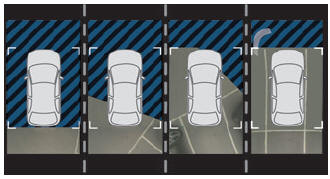
Using the rear camera, the vehicle's close surroundings are recorded during manoeuvres at low speed.

Copyright © 2026 www.ds3manuals.com