
DS 3: Driving recommendations / On flooded roads
DS 3 2016-2026 Owners Manual
We strongly advise against driving on flooded roads, as this could cause serious damage to the engine or gearbox, as well as to your vehicle's electrical systems.
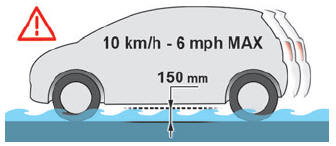
If the vehicle absolutely must drive through a flooded section of road:
- Check that the depth of the water does not exceed 15 cm, taking account of waves that might be generated by other users.
- Deactivate the Stop & Start function.
- Drive as slowly as possible without stalling. In all cases, do not exceed 6 mph (10 km/h).
- Do not stop and do not switch off the motor.
On leaving the flooded road, as soon as safety conditions allow, make several light brake applications to dry the brake discs and pads. If in doubt about the state of your vehicle, contact a dealer or a qualified workshop.
 Driving recommendations
Observe the driving regulations and remain
vigilant whatever the traffic conditions.
Monitor your environment and keep your
hands on the wheel to be able to react to anything
that may happen any time...
 Noise (Electric)
On the outside
Due to the vehicle’s quiet operation when driving,
the driver must pay particular attention.
At speeds of up to 19 mph (30 km/h), the
pedestrian horn warns other road users of the
vehicle’s presence...
Other information:
DS 3 2016-2026 Owners Manual: Applications
USB sockets Depending on equipment, for more information on the USB sockets compatible with CarPlay® or Android Auto applications, refer to the "Ease of use and comfort" section. For the list of compatible smartphones, visit the Manufacturer's website in your country...
DS 3 2016-2026 Owners Manual: Front head restraints
Adjusting the height Upwards: Pull the head restraint up to the desired position; you can feel the head restraint clicking into position. Downwards: Press lug A to lower the head restraint. The head restraint is correctly adjusted when its upper edge is level with the top of the head...
Categories
- Manuals Home
- 1st Generation DS 3 Owners Manual
- 1st Generation DS 3 Service Manual
- Central locking
- AdBlue® range indicators (BlueHDi)
- Orange warning/indicator lamps
- New on site
- Most important about car
Towing your vehicle
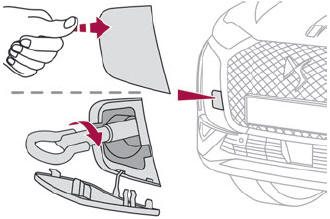
To access the front screw thread:

Copyright © 2026 www.ds3manuals.com