
DS 3: Ease of use and comfort / Courtesy lamps
DS 3 2016-2026 Owners Manual
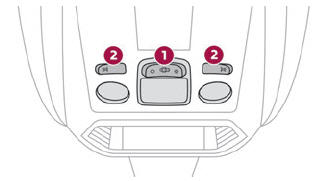
- Front courtesy lamp
- Front map reading lamps
Front courtesy lamps
 In this position, the courtesy
lamp comes
on gradually:
In this position, the courtesy
lamp comes
on gradually:
- on unlocking the vehicle,
- on removing the key from the ignition,
- on opening a door,
- on activating the remote control locking button, in order to locate your vehicle.
It switches off gradually:
- when the vehicle is locked,
- when the ignition is switched on,
- 30 seconds after the last door is closed.
 Permanently off.
 Permanent lighting.
In "permanent lighting" mode, the lighting time varies according to the circumstances:
- when the ignition is off, approximately ten minutes,
- in energy economy mode, approximately thirty seconds,
- with the engine running, unlimited.
Reading lamps
 With the ignition on, operate
the
corresponding switch.
With the ignition on, operate
the
corresponding switch.
 Take care not to place
anything in contact
with the courtesy lamps.
Take care not to place
anything in contact
with the courtesy lamps.
 Interior fittings
Grab handle
Sun visor
Glove box
Door pockets
Storage compartment or Wireless smartphone charger
Cup holder
Central armrest with USB port and 12 V accessory socket (depending on
version)
Storage compartment below the steering wheel
Sun visor
With the ignition on, raise the concealing flap;
depending on the version, the mirror is illuminated
automatically...
 Touch-sensitive courtesy lamps
Front touch-sensitive courtesy lamp
Front touch-sensitive reading lamps
Rear touch-sensitive reading lamps
Front touch-sensitive courtesy lamp
It comes on gradually:
when the vehicle is unlocked...
Other information:
DS 3 2016-2026 Owners Manual: Service indicator
The servicing information is expressed in terms of distance (miles or kilometres) and time (months or days). The alert is given at whichever of these two terms is reached first. The servicing information is displayed in the instrument panel. Depending on the version of the vehicle: The distance recorder display line indicates the distance remaining before the next service is due, or the..
DS 3 2016-2026 Owners Manual: General safety recommendations
Do not remove the labels attached in different places on your vehicle. They include safety warnings as well as identification information for the vehicle. For any work on your vehicle, use a qualified workshop that has the technical information, skills and equipment required, all of which a dealer is able to provide. Depending on country regulations, some safety equipment may be compu..
Categories
- Manuals Home
- 1st Generation DS 3 Owners Manual
- 1st Generation DS 3 Service Manual
- Headlamp beam height adjustment
- Use
- Stop & Start
- New on site
- Most important about car
Principle of operation
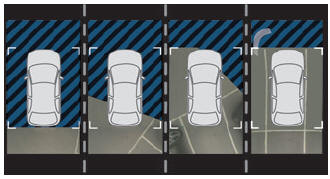
Using the rear camera, the vehicle's close surroundings are recorded during manoeuvres at low speed.

Copyright © 2026 www.ds3manuals.com