
DS 3: Safety / Emergency or assistance
DS 3 2016-2026 Owners Manual
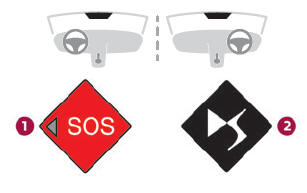
- Localised Emergency Call
- Localised Assistance Call
 Hazard warning lamps. Horn. Pedestrian horn (Electric)
Hazard warning lamps
Pressing this red button causes all the
direction indicators to flash.
They can work with the ignition switched off.
Automatic operation of hazard warning lamps
When braking in an emergency, depending on
the rate of deceleration, the hazard warning
lamps come on automatically...
 Localised Emergency Call (PE112)
In an emergency, press button 1 for more than
2 seconds.
The lighting of the indicator lamp and a voice
message confirm that the call has been made to
the emergency services*...
Other information:
DS 3 2016-2026 Owners Manual: DS PARK PILOT
For more information, refer to the General recommendations on the use of driving and manoeuvring aids. This system provides active parking assistance for vehicles fitted with the EAT8 automatic gearbox or a gear selector: it detects a free "parallel" or "bay" parking space and then operates the vehicle, parking it with no need for driver intervention...
DS 3 2016-2026 Owners Manual: Coolant temperature indicator
With the engine running: In zone A, the temperature is correct. In zone B, the temperature is too high. The associated warning lamp and the STOP warning lamp light up in red on the instrument panel, accompanied by the display of a message and an audible signal...
Categories
- Manuals Home
- 1st Generation DS 3 Owners Manual
- 1st Generation DS 3 Service Manual
- Headlamp beam height adjustment
- AdBlue® range indicators (BlueHDi)
- Alarm
- New on site
- Most important about car
Display in operation
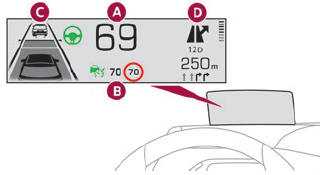
Once the system has been activated, the following information is grouped together in the head-up display:
The speed of the vehicle. Cruise control/speed limiter information and, if the vehicle is so equipped, the Road signs recognition function. If the vehicle is so equipped, inter-vehicle distance information, lane departure warning system information, lane positioning assist information, and automatic emergency braking alerts. If the vehicle is so equipped, navigation information.
Copyright © 2026 www.ds3manuals.com