
DS 3: Deactivating the front passenger airbag / Child seat at the front
DS 3 2016-2026 Owners Manual
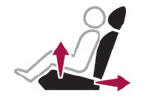
- Adjust the front passenger seat to the highest and fully back longitudinal position, with the backrest straightened.
"Forward facing"
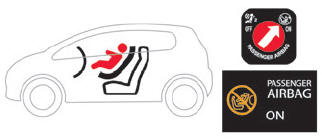
 You must leave the front
passenger airbag
active.
You must leave the front
passenger airbag
active.
"Rearward facing"
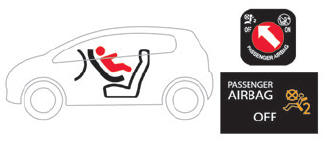
 The front passenger airbag
must be
deactivated before installing a rearward
facing child seat. Otherwise, the child risks
being seriously injured or killed if the airbag is
deployed.
The front passenger airbag
must be
deactivated before installing a rearward
facing child seat. Otherwise, the child risks
being seriously injured or killed if the airbag is
deployed.
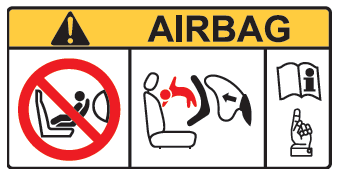
Warning label - Front passenger airbag
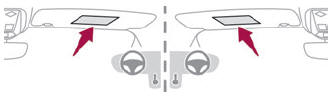
You must comply with the following instruction, as reminded by the warning label on both sides of the passenger sun visor:
NEVER use a rearward facing child restraint on a seat protected by an ACTIVE AIRBAG in front of it, DEATH or SERIOUS INJURY to the CHILD can occur.
 Deactivating the front passenger airbag
Forward-facing or rearward-facing
Move the vehicle's front seat forward and
straighten the backrest so that the legs of the
child in the forward-facing or rearward-facing
child seat itself do not touch the vehicle's front
seat...
 Deactivating the front passenger airbag
To ensure the safety of
the child, the front
passenger airbag MUST be deactivated
when a "rearward facing" child seat is
installed on the front passenger seat...
Other information:
DS 3 2016-2026 Owners Manual: Intelligent emergency braking assistance (iEBA). Active Safety Brake
Intelligent emergency braking assistance (iEBA) If the driver brakes, but not sufficiently to avoid a collision, this system will provide additional braking, within the limits of the laws of physics. This assistance will only be provided if the driver presses the brake pedal...
DS 3 2016-2026 Owners Manual: Rear foglamp
It only works if the dipped or main beam headlamps are on. Rotate the ring forwards/backwards to turn it on/off. When the lighting is switched off automatically ("AUTO" position) the foglamp and the sidelamps remain on. Switching on the foglamps is prohibited in clear weather or in rain, both day and night...
Categories
- Manuals Home
- 1st Generation DS 3 Owners Manual
- 1st Generation DS 3 Service Manual
- Orange warning/indicator lamps
- SCR system
- Central locking
- New on site
- Most important about car
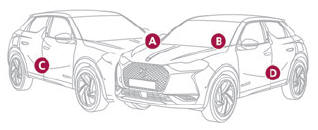
Identification markings
Various visible markings for vehicle identification and vehicle search.

Copyright © 2026 www.ds3manuals.com