
DS 3: Changing a fuse / Fuses in the dashboard
DS 3 2016-2026 Owners Manual
The fusebox is located in the lower dashboard (left-hand side).
To access the fuses, follow the same procedure as described for accessing the fuse replacement tools.
Fuse tables
Box 1
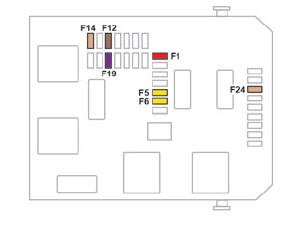
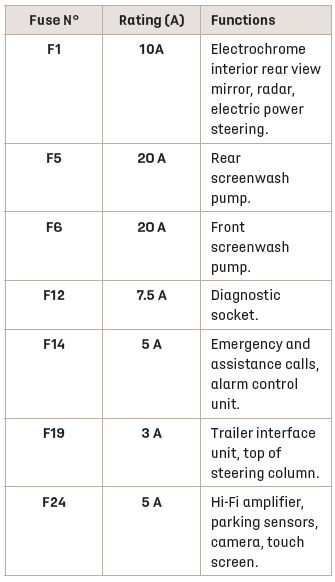
Box 2
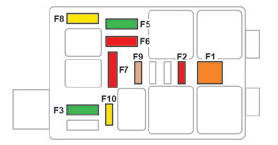
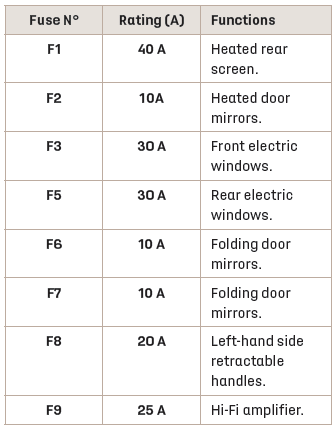
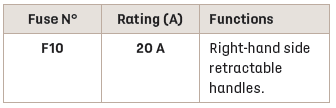
 Changing a fuse
Before changing a fuse:
Identify the cause of the fault and fix it.
Switch off all power consumption.
Immobilise the vehicle and switch off the
ignition...
 Engine compartment fuses
The fusebox is placed in the engine compartment
near the battery.
Accessing the fuses
Release the two latches A.
Remove the cover.
Replace the fuse...
Other information:
DS 3 2016-2026 Owners Manual: Towing your vehicle
To access the front screw thread: Unclip the cover by pressing at its top lefthand corner. Release the cover. To be towed: Screw the towing eye in fully. Install the towbar. Put the gearbox into neutral. In the event of a breakdown Failure to observe this instruction could result in damage to certain components (braking, transmission, etc...
DS 3 2016-2026 Owners Manual: Displaying fuel information
Press Navigation to display the main page. Press this button to display the list of services. Press "POI on map" to display the list of points of interest. Press one of the buttons to search for "Stations". Activate/deactivate "Stations". Press this button to display a secondary page...
Categories
- Manuals Home
- 1st Generation DS 3 Owners Manual
- 1st Generation DS 3 Service Manual
- Service indicator
- Activation/Deactivation
- Boot
- New on site
- Most important about car
Electric motor

Copyright © 2026 www.ds3manuals.com