
DS 3: Ease of use and comfort / Correct driving position
DS 3 2016-2026 Owners Manual
 For
safety reasons, adjustments must
only be made when the vehicle is
stationary.
For
safety reasons, adjustments must
only be made when the vehicle is
stationary.
Before taking to the road and to make the most of the ergonomic layout of the instruments and controls, carry out these adjustments in the following order:
- head restraint height.
- seat backrest angle.
- seat cushion height.
- longitudinal seat position.
- steering wheel height and reach.
- rear view mirror and door mirrors.
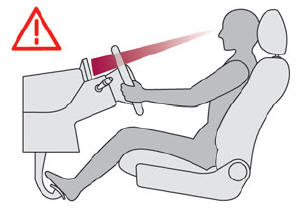
Once these adjustments have been made, check that the instrument panel can be viewed correctly from your driving position.

 Front seats
Before moving the seat backwards,
ensure that there is no person or object
that might prevent the full travel of the seat.
There is a risk of trapping or pinching
passengers if present in the rear seats or of
jamming the seat if large objects are placed on
the floor behind the seat...
Other information:
DS 3 2016-2026 Owners Manual: Service indicator
The servicing information is expressed in terms of distance (miles or kilometres) and time (months or days). The alert is given at whichever of these two terms is reached first. The servicing information is displayed in the instrument panel. Depending on the version of the vehicle: The distance recorder display line indicates the distance remaining before the next service is due, or the..
DS 3 2016-2026 Owners Manual: Touch-sensitive courtesy lamps
Front touch-sensitive courtesy lamp Front touch-sensitive reading lamps Rear touch-sensitive reading lamps Front touch-sensitive courtesy lamp It comes on gradually: when the vehicle is unlocked. when the ignition is switched off. when a door is opened. when the remote control locking button is activated, in order to locate the vehicle. It switches off: when the vehicle is locke..
Categories
- Manuals Home
- 1st Generation DS 3 Owners Manual
- 1st Generation DS 3 Service Manual
- Energy economy mode. Load reduction mode
- Door mirrors
- Central locking
- New on site
- Most important about car
Choosing the display mode
In each mode, specific types of information are displayed on the instrument panel.

Copyright © 2026 www.ds3manuals.com